On this page
Know the control systemRead the labelWire the X1 terminal blockWire the X2 terminal blockConnect the panel devicesRead the MCB boardSet the MCB jumpersSet the time outWire mains powerConvert to 24 VDC supplyStack two boardsLabel notesStart upMaintain itSpare partsMaterial listTroubleshootingTools and parts listSourcesFAQsThe Boon Edam THT-100 full-height turnstile control box sits in the top channel and has two 8-position terminal blocks for field wiring. X1 takes the fire alarm and access granted inputs, and X2 takes rotation detect, solenoid activate and home position (S1). Values are read off the label inside the control box (S1) and checked against Boon Edam's THT-100 manual (S3). Where the two differ, the label value is what's on the unit.
Know the control system
Flag- Mains feeds the control box in the upper top channel. The main control board (MCB) drives the locking solenoids that lock and unlock the turnstile (S3 p. 13).
- One-way controlled units have one MCB. Two-way controlled units have two, one per direction (S3 p. 13).
- The MCBs and solenoids are stacked in the control box (S3 p. 13).
- Each board is configured for a single direction of travel, with Fail Safe/Fail Lock set by jumper at the factory (S3 p. 35).
- Standard rotation is counter-clockwise (ACW) for entry from non-secure to secure, and clockwise (CW) for exit. Some units are ordered reversed, so check the order (S3 p. 15).
- Fail Lock units have a mechanical key override under the top channel near the upper flange (S3 p. 15).
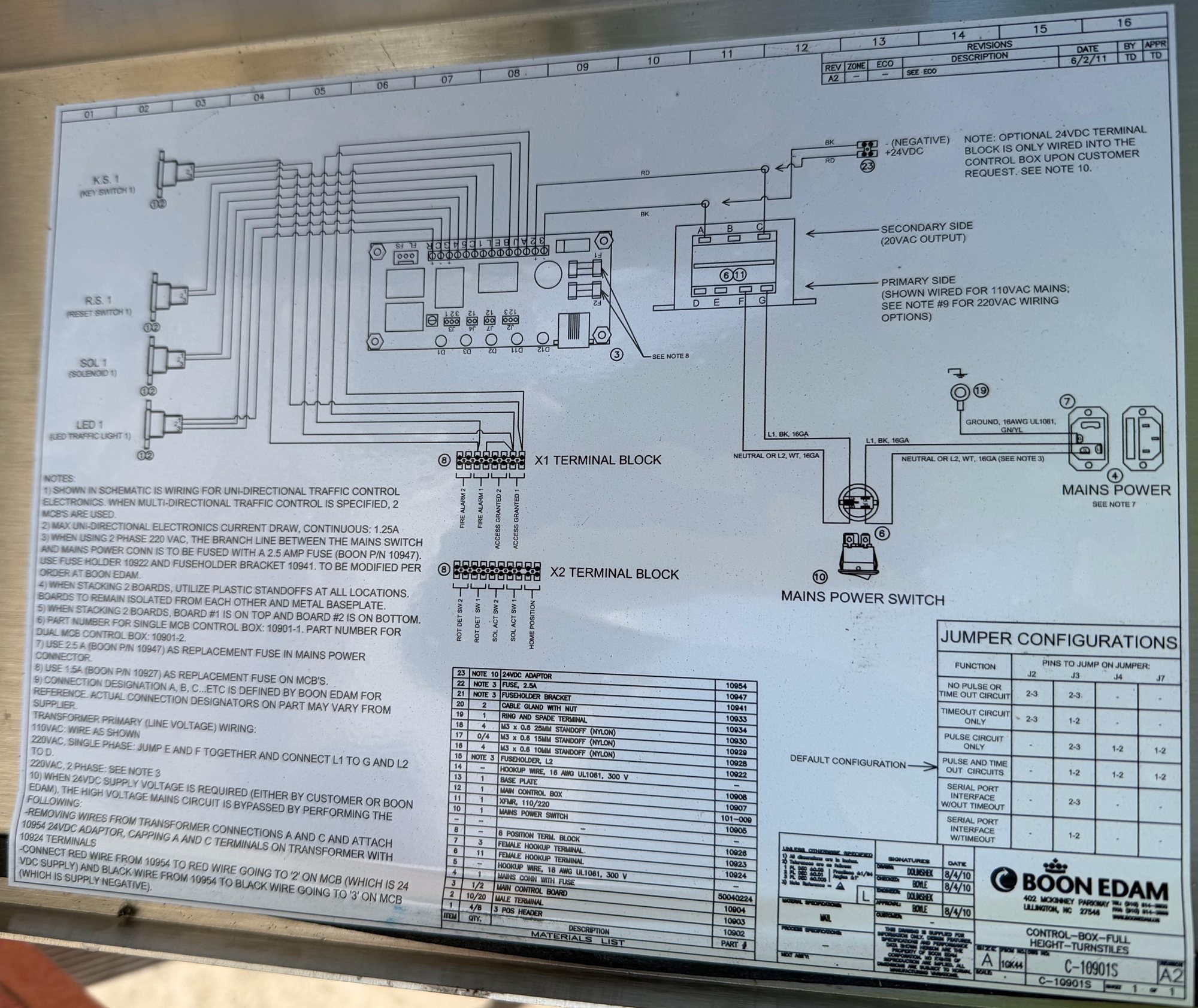
Read the label
Flag| Spec | Result |
|---|---|
| Title | Control Box, Full Height Turnstiles (S1) |
| Drawing number | C-10901S (S1) |
| Revision | A2, 6/2/11, "See ECO" (S1) |
| Size / scale | A / Not legible (S1); scale not given in S3 |
| Original drawing date | 8/4/10 (S1) |
| Single MCB control box part number | 10901-1 (S1) |
| Dual MCB control box part number | 10901-2 (S1) |
The schematic shows uni-directional traffic control. Multi-directional control uses 2 main control boards (MCBs) (S1). Units built for both directions use one MCB per direction (S2).
Wire the X1 terminal block
FlagX1 is item 8 on the material list, an 8-position terminal block. The label groups its terminals in pairs (S1).
Source: drawing C-10901S rev A2 label (S1)
X1 inputs are dry contacts. With the serial port interface jumpered, the MCB reacts to wet voltages of 3-25 VDC on X1 instead (S3 p. 35). Normally open or normally closed is not stated on the label or in the manual.
The label prints X1 left to right as FA 2, FA 1, AG2, AG1. The manual lists AG2, AG1, FA 2, FA 1. Land wires by the label order on the unit (S1, S3 p. 34).
Access grant input: the access control system sends one authorization signal and the MCB releases the solenoid for that direction (S3 p. 16). With the pulse circuit on, the MCB makes a one-shot pulse no matter how long the input is held (S3 p. 35).
Wire the X2 terminal block
FlagX2 is also item 8, an 8-position block (S1).
| Terminal | Connects to |
|---|---|
| Rot Det SW 2 (pair) | Rotation detection switch, CW. Dry contact closure back to access control when the unit turns (S1, S3 p. 34, S3 p. 17) |
| Rot Det SW 1 (pair) | Rotation detection switch, ACW (S1, S3 p. 34) |
| Sol Act SW 2 (pair) | Solenoid activation switch 2, tells access control the arms are unlocked (S1, S3 p. 34, S3 p. 17) |
| Sol Act SW 1 (pair) | Solenoid activation switch 1 (S1, S3 p. 34) |
| Home Position (pair) | Home position microswitch, made when the unit is at rest (S1, S3 p. 17) |
Source: drawing C-10901S rev A2 label (S1)
Rotation detection, home position and solenoid activation switches are optional (S3 p. 17). The manual lists the X2 names but not which of the 8 positions each pair uses, so position numbers remain Not legible (S1, S3 p. 34).
Connect the panel devices
FlagThe left side of the drawing shows four plug-in devices for one board wired to the MCB, each with a 3-pin connector (pins 1, 2, 3) (S1).
| Device | Label | Notes |
|---|---|---|
| Key switch 1 | K.S. 1 | Items 1, 2 called out (S1) |
| Reset switch 1 | R.S. 1 | Items 1, 2 called out (S1) |
| Solenoid 1 | SOL 1 | Items 1, 2 called out (S1) |
| LED traffic light 1 | LED 1 | Items 1, 2 called out (S1) |
Two-way units add KS 2, RS 2, SOL 2 and LED 2. Key switch, reset switch and solenoid plugs are connected at the factory. LED plugs are connected in the field (S3 p. 32).
| Cable P/N | Description | MCB plug | Device end |
|---|---|---|---|
| 10909 | Reset switch 1 cable | RS 1 | Reset switch, ACW |
| 10910 | Reset switch 2 cable | RS 2 | Reset switch, CW |
| 10911 | Keyswitch assembly 1 cable | KS 1 | Keyswitch, non-secure, ACW |
| 10916 | Keyswitch assembly 2 cable | KS 2 | Keyswitch, secure, CW |
| 10912 | LED 1 cable | LED 1 | LED 1, non-secure side |
| 10913 | LED 2 cable | LED 2 | LED 2, secure side |
| 10914 | Solenoid activation switch 1 cable | SOL 1 | Solenoid, non-secure activation side |
| 10915 | Solenoid activation switch 2 cable | SOL 2 | Solenoid, secure activation side |
| 10917 | Rotation detection switch 1 cable | Optional | Rotation detection microswitch, ACW |
| 10918 | Rotation detection switch 2 cable | Optional | Rotation detection microswitch, CW |
| 10919 | Home position switch cable | Optional | Home position microswitch |
Source: S3 p. 32
Traffic lights show red when locked and waiting, green on the granted side after a valid read, then red again after passage (S3 p. 17).
Read the MCB board
FlagThe label's board terminal and fuse markings are Not legible (S1). The manual's board layout gives these parts (S3 p. 35):
| Board item | Function |
|---|---|
| J2, J3, J4, J7 | Function jumpers (table below) |
| FS/FL jumper | Fail Safe / Fail Lock |
| R1 | Potentiometer, time out duration |
| Fuse 1 and 2 | 1.5 A |
| Serial port | Serial port interface |
| D11 | Fault condition indicator |
| D12 | Normal operation indicator |
| D1 | Lock activated |
| D2 | Pulse trigger |
| D3 | Pulse relay |
Set the MCB jumpers
FlagThe jumper table lists the pins to jump on J2, J3, J4 and J7. A dash means no jumper. The arrow on the label marks Pulse and Time Out Circuits as the default configuration (S1), and the manual calls it the factory default (S3 p. 35).
| Function | J2 | J3 | J4 | J7 |
|---|---|---|---|---|
| No pulse or time out circuit | 2-3 | 2-3 | – | – |
| Timeout circuit only | 2-3 | 1-2 | – | – |
| Pulse circuit only | – | 2-3 | 1-2 | 1-2 |
| Pulse and time out circuits (default) | – | 1-2 | 1-2 | 1-2 |
| Serial port interface without timeout | – | 2-3 | – | – |
| Serial port interface with timeout | – | 1-2 | – | – |
Source: drawing C-10901S rev A2 jumper configurations table (S1); matches S3 p. 35
- Time out relay. Holds the unit unlocked for a time after a valid grant, set by R1, then returns to standby (S3 p. 35).
- Pulse relay. Makes a one-shot pulse from the access grant input regardless of how long it is held (S3 p. 35).
- Serial port interface. Lets the MCB take 3-25 VDC wet inputs on X1 instead of dry contacts. Signal options are TD/SD, DTR and RTS (S3 p. 35).
Set the time out
FlagWire mains power
Flag- Size the circuit. The manual recommends a 20 A single-pole breaker on 110 VAC and a double-pole breaker on 220 VAC. Run mains, access control and fire alarm cable up through the conduit holes in the mid-posts (S3 p. 31).
- Check the draw. Max uni-directional electronics current draw, continuous, is 1.25 A (S1).
- Land mains. Mains come in on the mains power connector with fuse (item 4) and go through the mains power switch (item 10). L1 is black 16 GA; neutral or L2 is white 16 GA (S1).
- Ground it. Ground runs to a ring and spade terminal (item 19), 16 AWG UL1061, green/yellow (S1).
- Wire the transformer primary for 110 VAC. The transformer (item 11, XFMR 110/220) is shown wired for 110 VAC mains on primary terminals D, E, F, G (S1).
- Wire 220 VAC single phase. Jump E and F together, connect L1 to G and L2 to D (S1).
- Wire 220 VAC two phase. Fuse the branch line between the mains switch and mains power connector with a 2.5 A fuse (Boon P/N 10947), in fuseholder 10922 with fuseholder bracket 10941. This is modified per order at Boon Edam (S1).
The transformer secondary is terminals A, B, C, labeled "Secondary side (20VAC output)" on the drawing (S1). The manual also lists a 20 VAC secondary (S3 p. 42). Access control wiring enters through the cable glands next to X1 and X2 (S3 p. 34).
Label vs. manual:
- Mains range. Label: 110 VAC or 220 VAC. Manual: 110-240 VAC, 50/60 Hz, verify against the order (S3 p. 31). The label is what's on the unit.
- MCB supply. The label's 24 VDC conversion lands on MCB terminals 2 and 3, and the manual's spec lists the MCB at 24 VDC, 1.25 A max (S1, S3 p. 42). The control system section says 24 VAC (S3 p. 13). Follow the label.
- MCB fuse. Label: 1.5 A (P/N 10927). The manual's electrical section says 15 A, while its board layout and spare parts list say 1.5 A (S1, S3 p. 31, S3 p. 35, S3 p. 43). Use 1.5 A as on the label.
| Spec | Result |
|---|---|
| Mains | 110 VAC or 220 VAC (single or 2 phase) (S1) |
| Transformer secondary | 20 VAC output, as printed (S1) |
| Continuous draw, uni-directional | 1.25 A (S1) |
| Mains connector fuse | 2.5 A, Boon P/N 10947 (S1) |
| MCB fuse | 1.5 A, Boon P/N 10927, Fuse 1 and 2 (S1, S3 p. 35) |
| Solenoids | 24 VDC, 100% duty, -20 °C to +55 °C, about 20 ms response (S3 p. 42) |
| 2-phase branch fuse | 2.5 A, P/N 10947, holder 10922, bracket 10941 (S1) |
Convert to 24 VDC supply
FlagThe optional 24 VDC terminal block (item 23) is only wired into the control box on customer request. It has a negative terminal (BK) and a +24 VDC terminal (RD) (S1).
- Bypass mains. When a 24 VDC supply is needed, from the customer or Boon Edam, the high-voltage mains circuit is bypassed (S1).
- Pull the transformer wires. Remove the wires from transformer connections A and C and attach them to the 10954 24 VDC adaptor (S1).
- Cap the transformer. Cap transformer terminals A and C with 10924 terminals (S1).
- Land the adaptor. Connect the red wire from 10954 to the red wire going to "2" on the MCB (24 VDC supply), and the black wire from 10954 to the black wire going to "3" on the MCB (supply negative) (S1).
Stack two boards
Flag- Isolate. Use plastic standoffs at all locations. Keep boards isolated from each other and from the metal baseplate (S1).
- Order. Board #1 is on top and board #2 is on the bottom (S1).
Label notes
Flag- Schematic shows uni-directional traffic control electronics. Multi-directional uses 2 MCBs (S1).
- Max uni-directional electronics current draw, continuous: 1.25 A (S1).
- On 2-phase 220 VAC, fuse the branch line between mains switch and mains power connector with a 2.5 A fuse (P/N 10947), fuseholder 10922 and bracket 10941, modified per order at Boon Edam (S1).
- When stacking 2 boards, use plastic standoffs at all locations, isolated from each other and the metal baseplate (S1).
- When stacking 2 boards, board #1 is on top and board #2 on the bottom (S1).
- Single MCB control box: 10901-1. Dual MCB control box: 10901-2 (S1).
- Use 2.5 A (P/N 10947) as the replacement fuse in the mains power connector (S1).
- Use 1.5 A (P/N 10927) as the replacement fuse on MCBs (S1).
- Connection designations A, B, C and so on are Boon Edam reference letters. Actual designators on the part may vary by supplier. Primary wiring: 110 VAC as shown; 220 VAC single phase, jump E and F, L1 to G, L2 to D; 220 VAC 2 phase, see note 3 (S1).
- 24 VDC supply conversion, as covered above (S1).
Start up
FlagMaintain it
Flag- Daily, by the owner. Check for trip hazards and damage, listen for noise, present a valid card and rotate each authorized direction, check traffic lights, and confirm the unit positions and locks (S3 p. 38).
- Weekly. Clean the finish with a damp cotton cloth, no abrasives. Clean lexan with mild soap (S3 p. 38).
- Twice a year. Contractors check safety functions, run an access control function test, check solenoids, earth ground and wiring near moving parts, anchors, bottom bearing grease, locking pawl wear, key override, fire alarm and power failure functions, and dampening (S3 p. 38, S3 p. 39).
Spare parts
Flag| Part # | Description |
|---|---|
| 10920 | Solenoid assembly cable |
| 50040224 | Mains connector with fuse |
| 101-009 | Transformer, 110/220 VAC |
| 10905 | Mains power switch |
| 10904 | Main control board |
| 10927 | 1.5 A fuse, MCB |
| 101-012 | 2-way microswitch, home position / rotation detection |
| 101-015 | Microswitch gasket |
Source: S3 p. 43. The mains fuse is listed as 2.5 A with no part number there; the label gives 10947 (S1).
Material list
Flag| Item | Qty | Description | Part # |
|---|---|---|---|
| 23 | Note 10 | 24VDC adaptor | 10954 |
| 22 | Note 3 | Fuse, 2.5A | 10947 |
| 21 | Note 3 | Fuseholder bracket | 10941 |
| 20 | 2 | Cable gland with nut | 10933 |
| 19 | 1 | Ring and spade terminal | 10934 |
| 18 | 4 | M3 x 0.6 25mm standoff (nylon) | 10930 |
| 17 | 0/4 | M3 x 0.6 15mm standoff (nylon) | 10929 |
| 16 | 4 | M3 x 0.6 10mm standoff (nylon) | 10928 |
| 15 | Note 3 | Fuseholder, L2 | 10922 |
| 14 | – | Hookup wire, 16 AWG UL1061, 300 V | – |
| 13 | 1 | Base plate | 10908 |
| 12 | 1 | Main control box | 10907 |
| 11 | 1 | XFMR, 110/220 | 101-009 |
| 10 | 1 | Mains power switch | 10905 |
| 9 (shown as –) | – | – | – |
| 8 | – | 8 position term. block | 10926 |
| 7 | 3 | Female hookup terminal | 10923 |
| 6 | 11 | Female hookup terminal | 10924 |
| 5 | – | Hookup wire, 18 AWG UL1061, 300 V | – |
| 4 | 1 | Mains conn with fuse | 50040224 |
| 3 | 1/2 | Main control board | 10904 |
| 2 | 10/20 | Male terminal | 10903 |
| 1 | 4/8 | 3 pos header | 10902 |
Source: drawing C-10901S rev A2 material list (S1). Part numbers are printed on a skewed column; the 10954, 10947, 10941, 10922 and 10924 rows match the numbered notes.
Troubleshooting
Flag| Symptom | Likely cause | Fix |
|---|---|---|
| Turnstile won't unlock on a valid read | Access Granted pair on X1 not landed or wrong direction | Check Access Granted 1 vs 2 on X1 against travel direction (S1) |
| Turnstile behavior doesn't match the spec | Jumpers not at the needed function | Set J2, J3, J4, J7 per the jumper table (S1) |
| Mains fuse blows | Wrong fuse or primary wired for the wrong voltage | Use 2.5 A P/N 10947 and check E/F/G/D primary wiring (S1) |
| MCB dead, mains fine | MCB fuse open | Replace with 1.5 A P/N 10927 (S1). MCB LEDs are blank with no power (S3 p. 41) |
| Still dead after fuses | Board needs a restart | Power down, wait about 30 seconds, power up and let it fully initialize (S3 p. 41) |
| Unit won't lock | Solenoid, supply or plug issue | Check the locking solenoids, power supply and control box plugs (S3 p. 41) |
| Wrong home position | Shaft pin misaligned | Check top channel shaft pin and top flange guide alignment (S3 p. 41) |
| Second board acts up | Boards touching each other or the baseplate | Re-stack on nylon standoffs, board #1 on top (S1) |
Shut off mains power before working inside the control box.
Tools and parts list
Flag- Precision flat blade screwdriver for terminal blocks
- Wire strippers and cutters
- Multimeter
- 2.5 A fuse, P/N 10947 (S1)
- 1.5 A fuse, P/N 10927 (S1)
- M3 nylon standoffs, 10, 15 and 25 mm (S1)
Sources
- S1Boon Edam control box label, Control Box Full Height Turnstiles, drawing C-10901S rev A2 (field photo of the manufacturer's label)A2 · lvhandbook.com · pulled Oct 26, 2026
- S2Boon Edam Turnlock 100 full-height turnstile product pagewww.boonedam.com · pulled Oct 26, 2026
- S3Boon Edam THT-100 Full Height Turnstile Operation, Installation and Maintenance Manual, THT-100-IMM-USAA6 (10/28/2011) · pp. 13, 17, 31-37, 38-39, 41-43 · lvhandbook.com · pulled Oct 26, 2026

FAQs
What does a Boon Edam turnstile need from the access control panel?
A dry contact on X1 Access Granted 1 for one direction and Access Granted 2 for the other (S1, S2).
Where does the fire alarm tie into a Boon Edam full-height turnstile?
On the X1 terminal block, Fire Alarm 1 and Fire Alarm 2 (S1).
Can a Boon Edam turnstile run on 220 VAC?
Yes. On single phase, jump E and F and connect L1 to G and L2 to D on the transformer. On 2 phase, add a 2.5 A fuse on the branch line (S1).
What fuse goes in the Boon Edam control box?
2.5 A (P/N 10947) in the mains power connector, and 1.5 A (P/N 10927) on each main control board (S1).
Can the turnstile control box run on 24 VDC?
Yes. Wire the optional 24 VDC adaptor (10954) to MCB terminals 2 (+24 VDC) and 3 (negative) and cap transformer terminals A and C (S1).
Did this page help you?
Thanks for the feedback.